
Operator run view
Praxis naming: This page documents Praxis, the AIWS workflow engine. Existing
engine/*source paths,/engine/...routes,aiws-engine/*protocol identifiers, and existing script names remain unchanged for compatibility.
The native control page now opens with a run overview. Sign in through the configured host identity provider, enter a work order and choose Inspect work. The view reads one transactional engine snapshot and pairs it with the same workflow revision’s decision evidence. It grants no execution authority.
Read the overview
Section titled “Read the overview”| Area | What it tells you |
|---|---|
| Status and current stage | Where the workflow is now, separately from its execution control state |
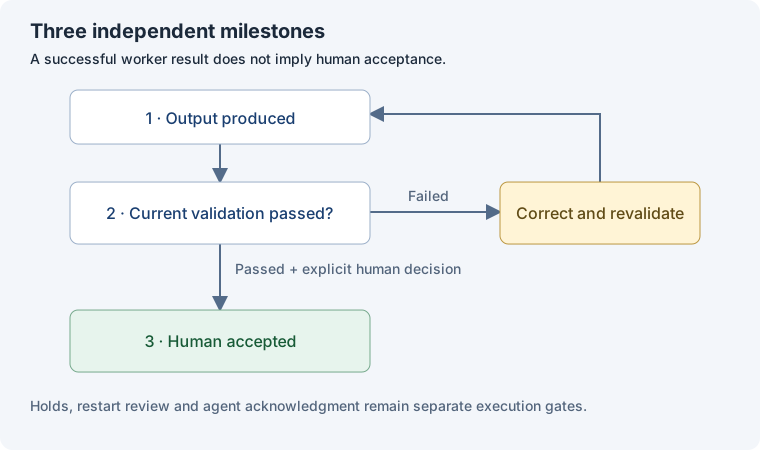
| Three milestones | Whether output exists, current durable validation passed, and a human accepted the work |
| Next decisions | Approval, acceptance, restart review, agent acknowledgment, reconciliation or paused/cancellation control work |
| Ownership | Assigned agent, active workers and latest context session kind |
| Resource exposure | Attempts used; active time and cost used plus reserved; configured limits and unsettled responsibility |
| Evidence | Plan reference, input digest, validation attempt, definition revision and deliverable file hashes |
| Attempt history | Latest 100 retained attempts, with delivery, assessment and historical invalidation shown separately |
Cost values use the engine’s configured units. They are not currency estimates. A stopped attempt can still carry unsettled exposure. The view preserves those reservations until the authoritative settlement path releases them. Historical passing assessments cannot satisfy current acceptance.
Refresh and decide
Section titled “Refresh and decide”Inspect work refreshes the view; there is no live push stream. A load-time label makes the snapshot’s age visible. Reload restores this tab’s selected work order and reads the engine again. Editing the selection, a failed inspection or a dynamic workflow change clears the old decision evidence. If the workflow revision changes between reads, refresh again before deciding.
Approve, pause, resume and cancellation use the existing scoped control service. Accepting validated work remains a distinct, explicitly confirmed human action. The server checks current revision, binding, identity and authorization when it handles the command.
Before sending a decision, the page saves its exact request in this tab’s session storage. If the response is lost, Retry saved decision resends the same request ID and body; Look up saved decision retrieves its durable result. Both require a fresh authenticated connection under the original actor and installation. A later rejection does not erase an earlier uncertain outcome. Saved bodies contain neither session credentials nor CSRF tokens. Closing the tab or clearing browser storage can remove this local recovery copy; engine receipts remain authoritative.
Host and CLI access
Section titled “Host and CLI access”In a host with an opened coding runner:
const snapshot = await runner.operatorView('work-order-id');// snapshot.format === 'coding-operator-view/1'// snapshot.authorized === falseThe host exposes GET /engine/operator-view/v1/{workOrderId} and authorizes the scoped operator-view action before and after the read. CLI credentials still arrive through protected standard input:
node engine/src/control-cli.ts https://127.0.0.1:PORT /secure/host-ca.pem operator-view work-order-id < /secure/credential.jsonThe operator response is a local engine inspection format; it adds no general workflow wire command or external integration.
Qualification
Section titled “Qualification”Engine regression and DOM interactions against the real authenticated HTTPS engine cover reload, exact replay after a lost committed response, distinct validation/acceptance and clearing stale evidence. Playwright headless Chromium then verified the same engine in an actual browser: authenticated inspection, a lost reply with reload and exact retry, validation separate from acceptance, acceptance surviving reload, and full-page captures at 1280 px and 390 px with no horizontal overflow on mobile. Reproducible DOM and Playwright checks are engine/scripts/verify-operator-ui.mjs and engine/scripts/verify-operator-browser.mjs; static TypeScript checking and the site build also passed. S5 is qualified; M6 platform and M8 release gates remain separate.
Application identity
Section titled “Application identity”The Praxis operator app and SDK documentation share the same SVG mark as their header logo and browser favicon. The app serves the icon locally, and the candidate bundle includes it with the web assets; no external image service is required.