
Architecture and workflow diagrams
Praxis naming: This page documents Praxis, the AIWS workflow engine. Existing
engine/*source paths,/engine/...routes,aiws-engine/*protocol identifiers, and existing script names remain unchanged for compatibility.
The first ten diagrams were generated from the repository at commit 13f323f with Archify. Each one is a self-contained page with light and dark themes, pan and zoom, search, relationship tracing, guided views and PNG or SVG export. The two architecture pages link their nodes to the source files on GitHub. Use a diagram inside its frame, or open it full screen for the complete toolbar.
The JSON source of every diagram lives beside it under docs/diagrams/ in the repository, together with the regeneration commands and the browser evidence from the last delivery.
Facts the diagrams encode
Section titled “Facts the diagrams encode”- The engine under
engine/srcimports only Node built-ins. It does not depend on the SDK packages. - The static control API accepts four commands: approve, pause, resume and cancel. The eleven governed dynamic-workflow decisions ride a separate
/engine/dynamic/v1/requestsplane. - OTLP export is an SDK capability. The engine keeps a bounded telemetry queue but contains no OTLP code.
- A timeout, signal or null exit code is classified UNKNOWN on every platform. Only the signed Windows native helper can prove self-termination.
- The push and pull-request path of the native helper workflow builds and probes but never signs or uploads. Signing happens only on manual dispatch, and platform qualification is a manual step on a native Windows host.
- Every platform-matrix cell remains UNVERIFIED.
System overview
Section titled “System overview”The host application, the three native SDKs, the shared spec, the self-contained engine, this documentation site, CI and the signed Windows helper. Read with engine decisions and implementation boundary and the capability matrix.
Governed coding workflow
Section titled “Governed coding workflow”Human approval, implementation, validation, pinned evidence, bounded correction, holds and human resume. Read with run a governed coding workflow.
Control API decision lifecycle
Section titled “Control API decision lifecycle”Inspect, approval challenge, single-transaction command, receipt and exact-retry replay. Read with engine API, CLI and web controls.
Coding work order lifecycle
Section titled “Coding work order lifecycle”The five CodingStatus values, bounded correction, holds and cancellation. Read with run a governed coding workflow and validation and correction.
Engine internals
Section titled “Engine internals”Control plane, identity adapter, runner, bounded storage executor, SQLite worker thread, clock gate and telemetry queue. Read with engine decisions and implementation boundary and SQLite persistence and recovery tests.
Observability export pipeline
Section titled “Observability export pipeline”Event and trace intent committed together, leased outbox, OTLP/HTTP export, retained failures and alerts. Read with observability, metrics and OTLP delivery.
Windows native helper pipeline
Section titled “Windows native helper pipeline”Build and probe on push or pull request, Azure Artifact Signing and Authenticode verification on manual dispatch, then manual qualification on a native Windows host. Read with deployment and platform qualification.
Operation effect lifecycle
Section titled “Operation effect lifecycle”PREPARED, DISPATCHED, SUCCEEDED and CONFIRMED_APPLIED; UNKNOWN reconciliation, retry after CONFIRMED_NOT_APPLIED and epoch fencing. Read with effects, operation identities and retries and recovery.
Worker dispatch lease
Section titled “Worker dispatch lease”Claim under the clock gate, supervised admission, acknowledge, execute without a shell and classify the outcome. Read with worker dispatch and coding execution.
Engine backup and restore
Section titled “Engine backup and restore”Checkpoint, sealed manifest, atomic publication, host-verified restore, RESTORE HOLD and human activation. Read with engine backups and same-machine restore.
M9 protocol architecture package
Section titled “M9 protocol architecture package”M9.10 adds four scalable SVG maps. These are intentionally visual documentation assets rather than Mermaid/ASCII diagrams.
Protocol system map
Section titled “Protocol system map”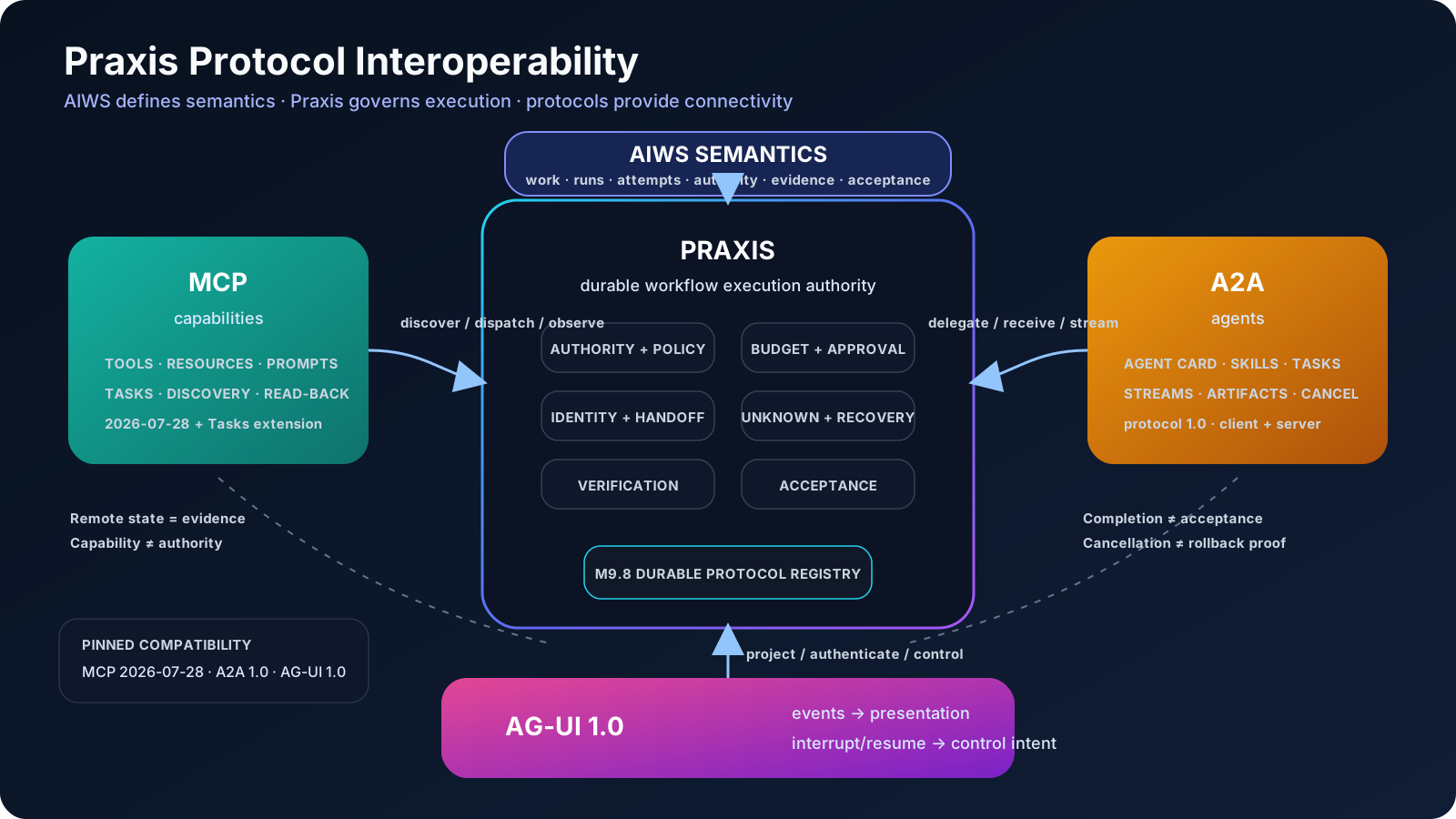
MCP / A2A / AG-UI mapping
Section titled “MCP / A2A / AG-UI mapping”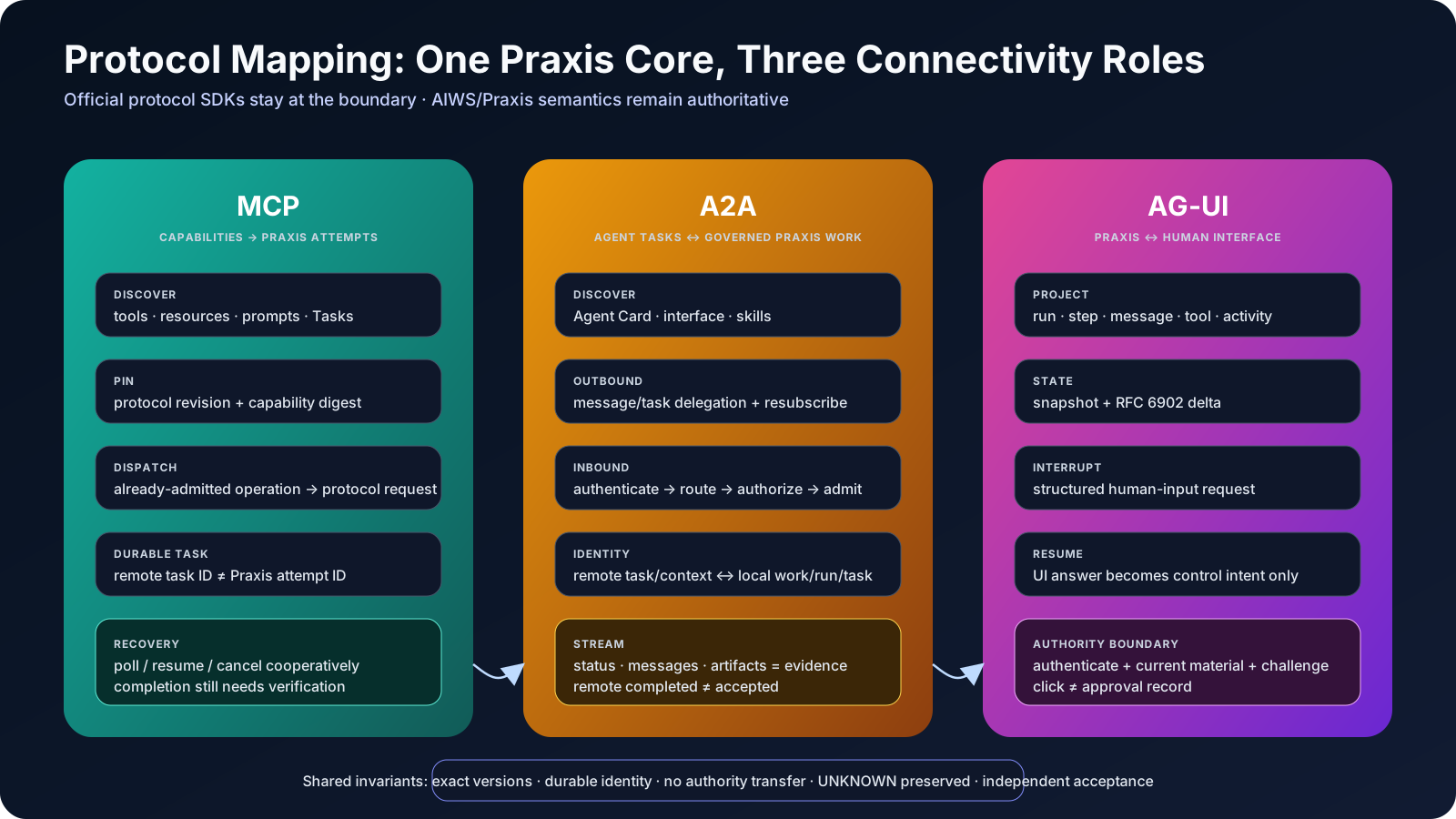
Durable identity and registry
Section titled “Durable identity and registry”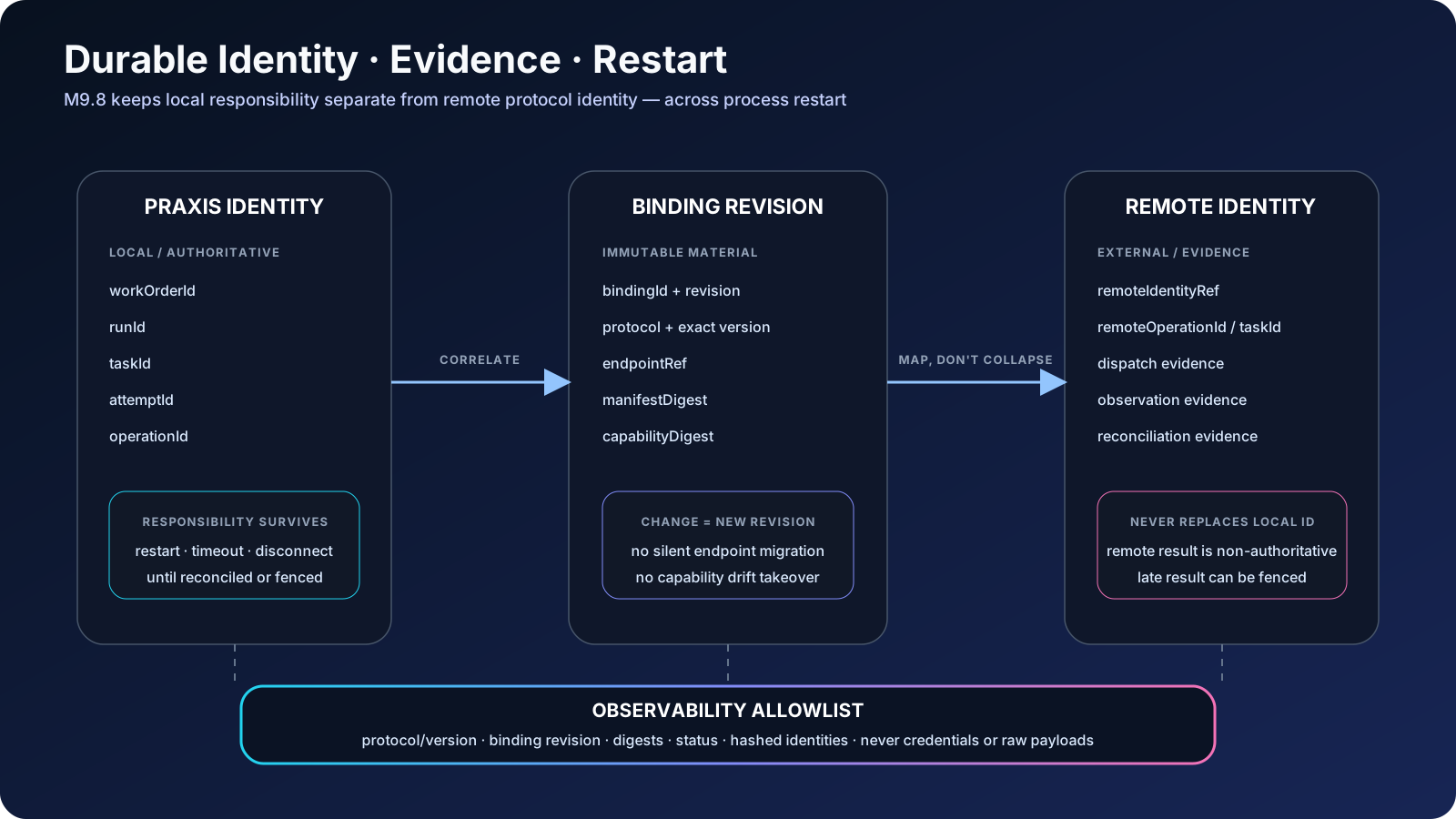
UNKNOWN and recovery
Section titled “UNKNOWN and recovery”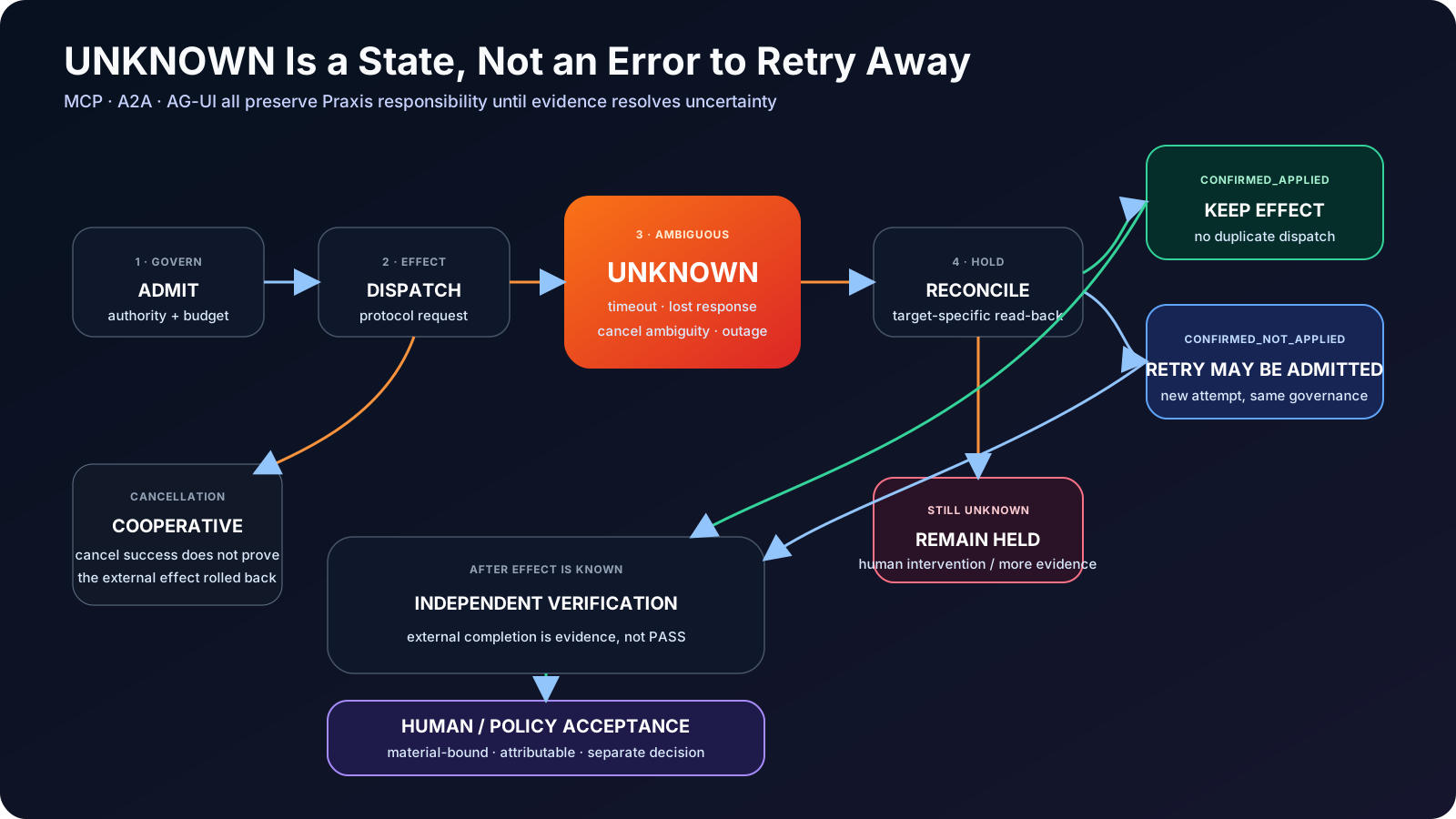
Read Praxis protocol interoperability, protocol operations and recovery and M9 completion and compatibility with these maps.
Regenerating a diagram
Section titled “Regenerating a diagram”Each docs/diagrams/<name>.<type>.json file is the source of truth. After editing one, validate and deliver it with the Archify CLI, then run the browser check. Architecture pages need --repo-root because they carry source-file evidence.
node <archify>/bin/archify.mjs validate <type> docs/diagrams/<name>.json --quality showcase [--repo-root .]node <archify>/bin/archify.mjs deliver <type> docs/diagrams/<name>.json docs/diagrams/<name>.html --quality showcase [--repo-root .]node <archify>/bin/archify.mjs visual-check docs/diagrams/<name>.htmlThe site build copies the delivered HTML from docs/diagrams/ into public/diagrams/, so a regenerated diagram appears here after the next npm run build or npm run dev. Adding a diagram means adding its entry to docs/diagrams/index.json and a section on this page.